December 2, 2025
Home update, deep search, file notes and much more
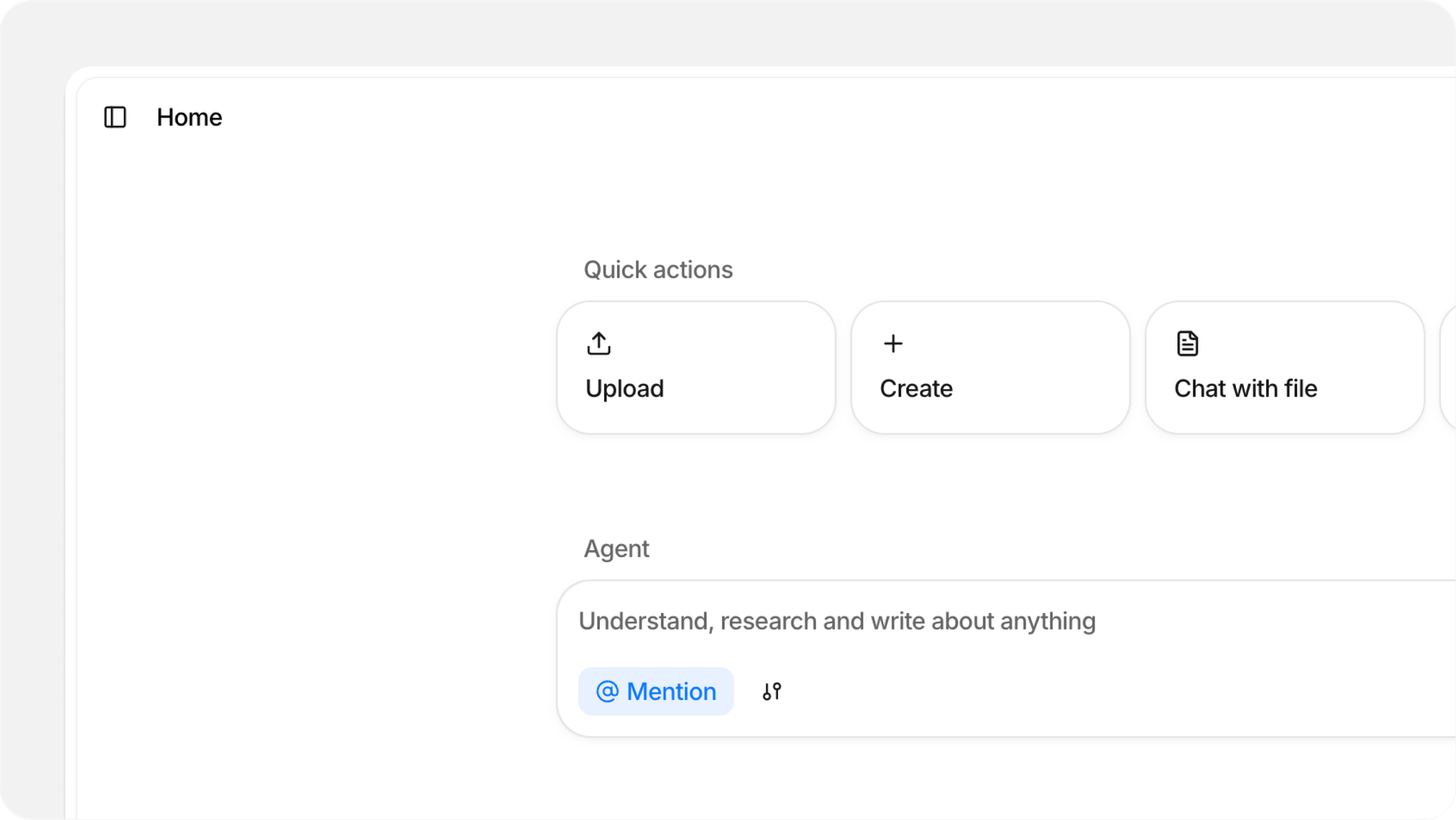
This is one of our biggest updates yet. We rebuilt the home page and navigation from the ground up, added notes that live inside files, overhauled folder sharing, and introduced two powerful new search capabilities with Deep Search and PubMed integration.
Home and navigation
Our new Home page introduces widgets to give you faster access to the things you use most. Quick Actions lets you upload, create, and chat with files in fewer clicks, the Agent widget keeps agent front and center, and the Recent widget shows your most recently opened files.
The Chat has moved to a dedicated tab in the right sidebar, accessible from the icon in the top right corner. File and folder chats no longer appear top level in the library - find them in the dropdown at the top of the chat window.
The previous homepage is now its own Agent page, with chat history accessible via the clock icon in the top left.
File notes
You can now attach notes directly to files and folders, replacing the previous notes sidebar. Select any file, open the Notes tab in the right sidebar, and start writing. Use the generate button to create AI-powered notes that draw context from your chats, file content, and existing notes.
Deep Search agent
We're introducing a new Deep Search agent for complex questions that span many files or require working through large documents. It runs multiple passes through your content, aggregating and analyzing as it goes, producing a much more detailed responses than regular chat. Deep Search is available on our new Max plan, which also includes access to top tier advanced AI models like Claude Opus 4.5 and Gemini 3 Pro.
Folder sharing
A new, larger invitation screen gives you more control over shared folders. Edit the folder title and add descriptions directly from here, manage members in a dedicated tab, and switch user roles after inviting them. We also introduced a new Viewer role that lets people view and chat with files without making changes.
PubMed search
Finally, you now have access to over 10 million biomedical and life sciences articles from PubMed directly within Anara. Use the @PubMed tool in chat to search, find, and analyze research papers without leaving the app.
Improvements
- Improved DOI import to automatically accept full DOI URLs (like https://doi.org/10.1038/nature08221) in addition to DOI identifiers, eliminating the need to manually extract the ID portion.
- The command palette (⌘K) now automatically detects when you paste a URL and suggests the "Import via URL" option, making it faster to import content from external sources.
- Improved performance when loading related content, resulting in faster page loads and smoother navigation throughout the application.
- Added support for Claude 4.5 Opus, GPT-5.1 and Gemini 3 Pro models, providing access to the most advanced AI capabilities for complex reasoning and analysis tasks.
- Drag-and-drop zones across the app now share a consistent, cleaner visual design for a more polished experience.
- The editor's edit menu now opens instantly instead of sliding in, providing a snappier and more consistent experience across the interface.
- DOI and URL imports now process in the background, allowing you to continue working immediately after starting an import instead of waiting for the modal loading to complete.
- Limit notification messages now display the exact local time when the limit will reset, making it clearer when free usage limit rests.
Fixes
- Fixed pricing display to show USD currency symbol when local currency detection fails, preventing confusion about actual subscription costs.
- Fixed an issue where importing from Zotero and other reference managers would sometimes get stuck loading indefinitely, preventing successful import of your research library.
- Fixed issues with code block editing where the last line couldn't be deleted and the plain text toggle button was unresponsive.
- Fixed an issue where previous search terms remained in the command menu (⌘K) when reopened, now automatically clears for a fresh search each time.
- Fixed performance issues with the OneDrive import modal, making file imports faster and more responsive.
- Fixed an issue where creating a new chat would sometimes incorrectly redirect you to an existing chat instead of starting fresh.
- Fixed table filters displaying technical names like "InArray" instead of user-friendly labels such as "has any of".
- Fixed an issue where imported files would show as loading indefinitely in the table, requiring a page refresh to clear the loading state.
- Fixed an issue where dropping images at the bottom of a note would open them in the browser instead of adding them to the note.
